Descript Free, Itemized: What Studio Sound Costs at $0
Descript's $0 tier includes Studio Sound, on a short meter. Here is the receipt, line by line, and the free tools that last longer.
Descript has a $0 tier, and yes, it includes Studio Sound, the one-click effect that strips background noise and echo from a voice. The catch is the meter. Descript Free gives you one hour of media a month, which you spend by uploading or recording anything, and 100 AI credits that arrive once, not every month, which Studio Sound draws on along with every other AI tool. Descript's pricing page marks Studio Sound on Free as "Limited". That is enough to clean a short test clip and hear what the effect does to your voice. It is not a free way to clean a weekly show, and when the credits are gone they do not come back next month.
This receipt is for anyone who searched "is Descript free" with a noisy recording in hand. Plan details below are as of 18 Oct 2026, read from Descript's pricing page and help center.
The receipt
Here is Descript Free rung up the way we ring up every tool: what you pay, and what you actually hand over for it.
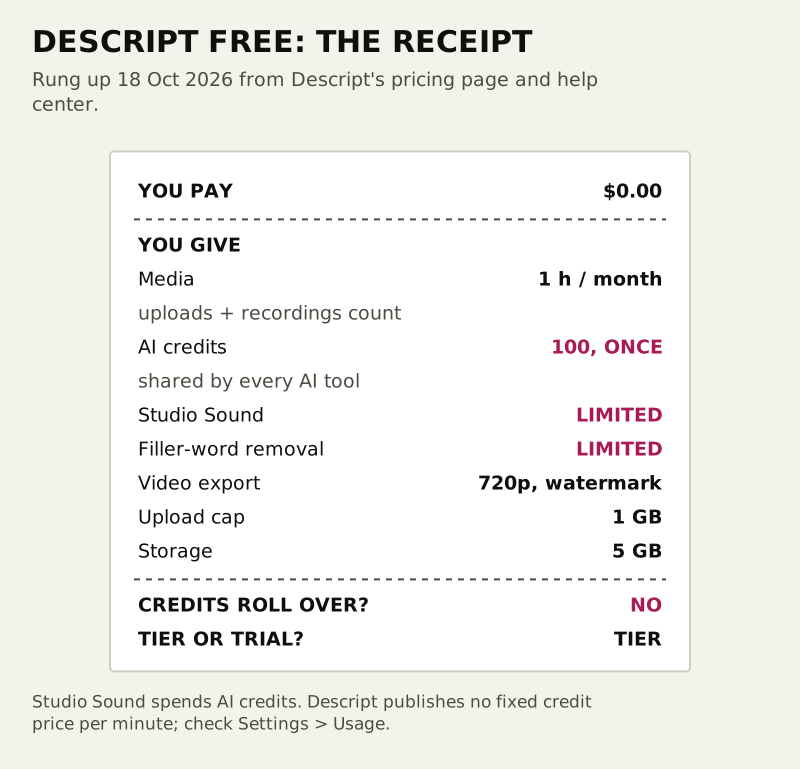
- You pay: $0. It is a plan, not a trial, and the pricing page puts no time limit on it.
- You give: one hour of media each month, per editor. Uploading a file, recording in Descript and recording in Rooms all count, and still images count as one second each.
- You give: 100 AI credits, granted once. Studio Sound, Remove filler words, Underlord and every other AI feature spend from the same pile.
- You give: Studio Sound and filler-word removal listed as "Limited" on Free.
- You give: video exports capped at 720p and not watermark-free, a 1 GB upload cap and 5 GB of storage.
So the verdict on the receipt is a pass with a caveat. Descript Free is forever-free in the ZeroHum sense, a tier you can stay on, but the part most people want it for, Studio Sound, rides on a one-time allowance.
How the two meters work
Descript meters everything in two currencies, and its help center explains both. Media minutes are the time you use whenever you upload or record media: video, audio, Room sessions, screen and webcam recordings. AI credits are what AI features consume. On paid plans both refill when the subscription renews, and unused amounts do not roll over.
For the $0 tier, the important difference is that the 100 AI credits are a one-time grant. Your hour of media comes back each month; the credits do not.
What Studio Sound charges
Descript does not publish a fixed credit price per minute of Studio Sound. Its help page says manually applied AI effects cost an amount that scales with the size of the job, so longer audio uses more credits, and running the same input twice costs the same both times. Underlord, the AI co-editor, is the unpredictable one: the same kind of request can cost different amounts depending on the model and the work involved.
The practical move is to measure it yourself. Apply Studio Sound to a short clip, then open Settings, choose your drive, and look at the Usage tab, which shows what each run cost. That one test tells you roughly how far 100 credits will stretch for your kind of audio.
The upload trap
Media minutes are charged on what you bring in, not on what you clean. Upload a 50-minute interview to fix a five-minute stretch of hiss and you have spent most of the month's hour already. Trim the file before you upload it, and you can clean the bad patch for a fraction of the allowance.
What Studio Sound actually does
Descript describes Studio Sound as an AI audio effect that improves spoken voice by reducing background noise, echo and other distractions, and suggests it for recordings that sound noisy, echoey or captured on a laptop mic. A few working details from the help page are worth knowing before you spend credits on it.
- It needs an internet connection, because the processing is not done offline.
- It applies at the file level, so it changes every use of that file in your project.
- An Intensity slider sets how much enhancement you get.
- You can switch it on while recording in the main editor or the Screen Recorder.
- It does not work on AI-generated speech until you convert that to an audio layer.
To clean only part of a file, Descript's own workaround is to copy that stretch into a new composition, flatten it into a new file and apply Studio Sound there.
The $0 shelf, side by side
Descript Free is one of several free ways to clean a recorded voice, and its allowance is the smallest of the ones that refill.
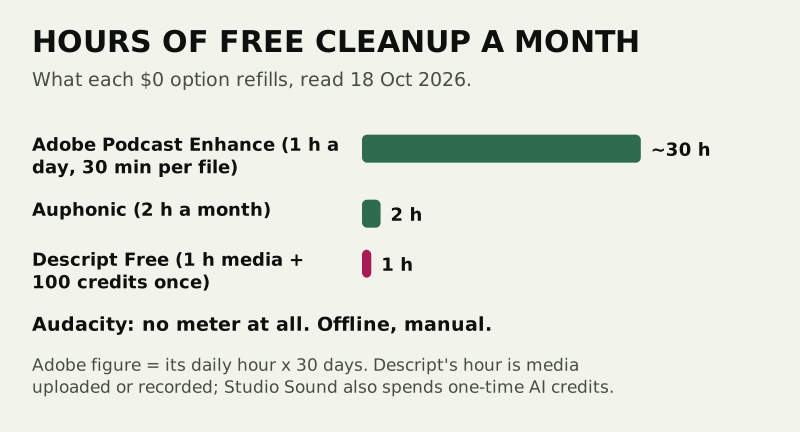
Each has a different shape. Adobe Podcast Enhance refills every day but caps a single file at 30 minutes. Auphonic's free account processes up to 2 hours each month, and unused hours do not carry over. Audacity costs nothing and has no meter at all, but its noise reduction is manual: you sample a stretch of noise and it removes that profile, which suits steady hiss better than room echo. Our Audacity walkthrough and the Adobe Enhance receipt itemize both.
When Free stops being enough
Three signs say you have outgrown the $0 tier. You record more than an hour a month in Descript itself. You want Studio Sound on every episode rather than on a test clip. Or you need video exports without the watermark. Descript's paid plans add a monthly refill of both currencies: its pricing page lists Hobbyist with 10 media hours and 400 AI credits a month, and Creator with 30 hours and 800 credits.
Edge cases
Older Descript accounts
Descript moved every Legacy and Sunset subscriber to its current plans from November 17, 2025, on each account's next billing date. If your plan name in Settings looks unfamiliar, the Plan tab shows which one you are on.
Live calls
Studio Sound cleans recordings. It does nothing for a meeting in progress. For that you need a filter on the microphone itself, which our free apps for calls page itemizes.
Exporting your usage
The Usage tab works on every plan, but exporting usage to a CSV file is not available on Free.
Questions we get
Is Descript free?
Yes. Descript Free costs $0 and is a plan, not a time-limited trial. It includes one hour of media a month, 100 AI credits granted once, video exports up to 720p that are not watermark-free, a 1 GB upload cap and 5 GB of storage, as of 18 Oct 2026.
Does Descript Free include Studio Sound?
Yes, but Descript lists it as "Limited" on Free. Studio Sound spends AI credits, and Free's 100 credits are a one-time grant shared with every other AI feature.
How many AI credits does Studio Sound use?
Descript does not publish a fixed rate. Its help center says the cost scales with the length of the audio and is the same each time for the same input. Run it on a short clip and check the Usage tab in Settings.
Do Descript media minutes and credits roll over?
No. Unused media minutes and AI credits do not carry into the next billing cycle. On Free, the hour of media returns each month, but the 100 credits do not.
What is the best free alternative to Studio Sound?
For a daily refill, Adobe Podcast Enhance: an hour a day at $0, 30 minutes per file. For a fully offline option with no meter, Audacity's manual noise reduction. Auphonic's free account adds 2 hours a month of automatic cleanup.