Free Noise Cancelling on a Mac: Mic Mode, In-App Toggles, and What Krisp Costs
The Mac's free noise filter is already installed. Here's where Voice Isolation works, which call apps help, and why Krisp is a trial.
The best free noise cancelling option on a Mac is already installed: macOS's Voice Isolation mic mode, which filters background sound in FaceTime and in other apps that support Mic Modes. Add the noise suppression built into Zoom and Teams, and Discord's Krisp toggle if your Mac has Apple silicon, and that's the whole free shelf for live calls. The big Windows freebies, NVIDIA Broadcast and SteelSeries Sonar, don't exist for macOS. And Krisp for Mac isn't free: it's a 7-day trial with no card, after which it costs $8 a month on annual billing ($16 if you pay monthly).
This receipt is for Mac users who searched for a free noise cancelling app and got a page of Windows downloads. If you're on Windows, our Windows page has a much longer list.
Short answer: the Mac's best free option is built in
Macs on a recent macOS have Mic Modes, and one of them is Voice Isolation. Apple describes it simply: to filter out background sounds, select Voice Isolation. It costs nothing, needs nothing installed, and asks for no account beyond the Mac you already own. On 9 October 2026 the current release is macOS 27, and Apple's guide for it describes the same three modes: Standard, Voice Isolation and Wide Spectrum. Apple's FaceTime guide adds a model limit: Wide Spectrum is for Macs from 2018 onward.
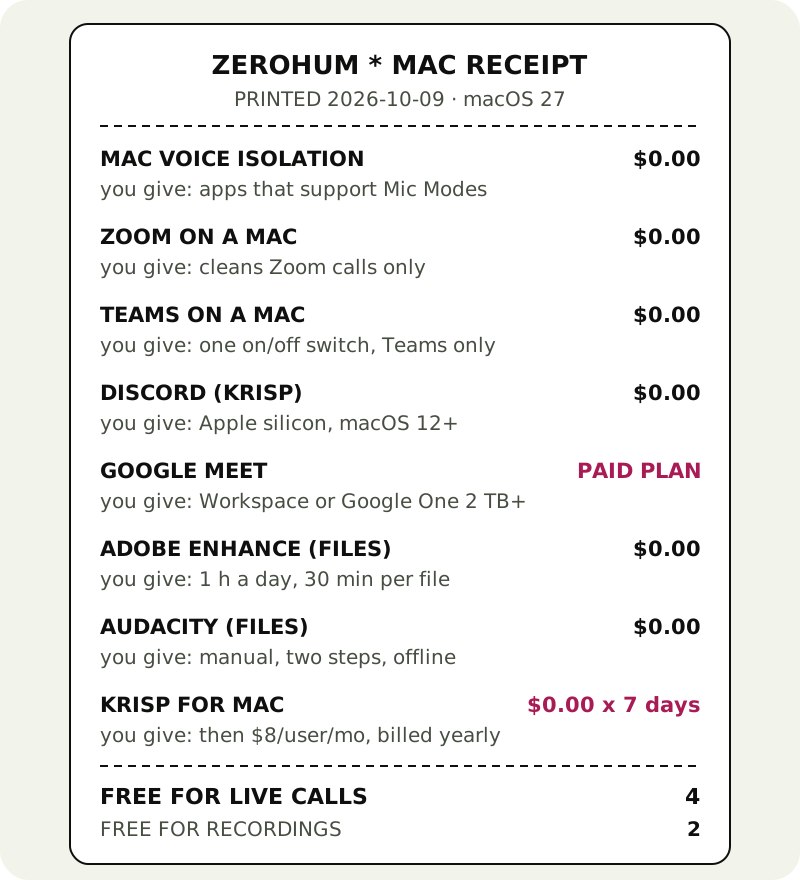
Here's the whole Mac shelf, rung up. Six lines cost $0 for good; one is a trial, and one needs a paid Google plan.
- Voice Isolation (macOS): $0. You give: it only appears in apps that support Mic Modes.
- Zoom's own suppression: $0. You give: it only cleans Zoom calls.
- Teams' own suppression: $0. You give: one on/off switch, Teams only.
- Discord's Krisp toggle: $0. You give: Apple silicon and macOS 12 or later, and Discord only.
- Google Meet noise cancellation: needs a paid Workspace edition or Google One with 2 TB or more on a computer.
- Adobe Enhance Speech, for recordings: $0 for up to 1 hour a day, 30 minutes per file.
- Audacity, for recordings: $0, offline, and manual.
- Krisp for Mac: $0 for 7 days; after that, Core at $8/user/month on yearly billing or $16 on monthly billing.
Mic Mode: where it appears, and where it doesn't
Turning it on takes three clicks. Start in FaceTime or any other app with Mic Mode support, ideally with a call or test recording running. Click the Video item in the menu bar, choose Mic Mode, then pick Voice Isolation. To go back, pick Standard. Wide Spectrum does the opposite of what you want here: it lets in the sounds around you, which is great for music and terrible for a café.
The catch is in Apple's own wording: "options vary by app". Apple's article names FaceTime and no other app, so we won't promise that Voice Isolation shows up in Zoom, Teams or your browser. The honest way to find out takes ten seconds: join a test call in the app you actually use, click Video in the menu bar and see whether Mic Mode is there. If it is, you've found your free filter. If it isn't, the app's own setting is your next stop.
One more Apple detail worth having on the receipt: Apple doesn't say on its support pages where Voice Isolation does its processing, so we make no on-device promise for it either way.
In-app suppression: Zoom, Teams, Meet
Every big call app ships its own noise filter, and on a Mac these are usually the most dependable free option, because they don't rely on the app supporting Mic Modes.
Zoom puts it under Settings, then Audio, then Microphone modes: choose Noise removal and set Background noise suppression to Auto, Low, Medium or High. High is the most aggressive and, Zoom notes, can raise CPU use. Zoom also offers Personalized audio isolation on Mac, which learns your voice; Zoom says the automatic voiceprint stays on your device.
Microsoft Teams on desktop keeps a Noise suppression toggle in Settings, then Devices, and it starts switched on. It's one switch, on or off; the Auto, Low and High levels only exist in the iPhone app. Teams also offers voice isolation once you record a voice profile.
Google Meet is the one that surprises people. Its noise cancellation, under More options, Settings, Audio, is available on a computer only with paid Workspace editions or a Google One plan of 2 TB or more. A free Gmail account in Safari or Chrome on a Mac doesn't get it. On a free account, run the ten-second Mic Mode check above while Meet has the microphone; if Mic Mode isn't offered there, there's no free filter left for Meet on that Mac, and Krisp's trial is the remaining route.
Discord is the bonus line. Its built-in Krisp toggle (User Settings, Voice & Video, Noise Suppression, Krisp) is free and runs on your device, but on a Mac it needs Apple silicon and macOS 12 or later. Intel Macs are left out.
The Windows freebies you can't use
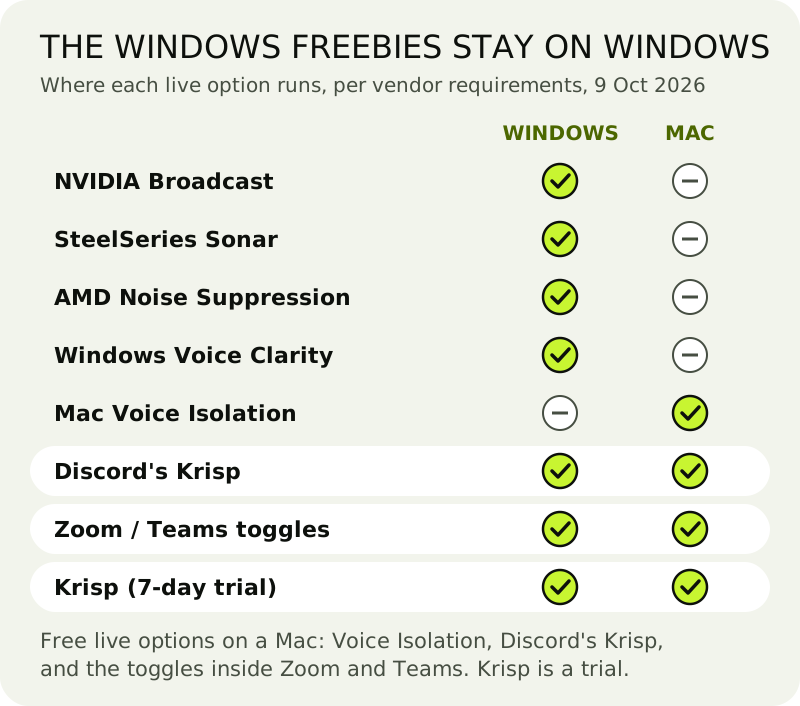
Most "free noise cancelling app" lists are Windows lists with a Mac headline. Here's why the famous free names don't help on macOS, straight from each vendor's requirements:
- NVIDIA Broadcast needs an RTX graphics card and lists Windows 10 64-bit as its only platform. No Mac build.
- SteelSeries Sonar lists Windows 10 (RS5+) and nothing else.
- AMD Noise Suppression lives in AMD's Windows driver software, for Windows 10 and 11.
- Windows Voice Clarity is a Windows 11 feature.
That leaves the Mac with a shorter free shelf than Windows: three kinds of live option (Voice Isolation, your call app's toggle and Discord's Krisp) against six on a Windows PC. It isn't that Mac users are being upsold; the free hardware-tied tools were simply built for PC graphics cards and drivers. Our free apps for calls receipt shows the Windows side in full.
Trials vs free: Krisp on Mac
Krisp is the name that comes up most for noise cancelling on a Mac, and it does run there: macOS 14 Sonoma or later, on an Intel Core i5 or Apple silicon Mac with 8 GB of RAM, according to Krisp's help centre. It installs two virtual devices, Krisp Microphone and Krisp Speaker, that you pick in your call app; it cleans your voice and what you hear, and Krisp says the processing stays on your Mac. Because it sits in front of every app, it doesn't depend on Mic Mode support at all.
What it isn't is free. Nothing in Krisp's lineup stays at $0 once the trial is over. You'll still find pages, some of them recent, claiming otherwise; the pricing page and Krisp's Terms of Use are the ones that count. On 9 October 2026 those show seven trial days with all premium features and no card needed. When it ends, access stops unless you buy Core: $8 per user per month when billed for a year, or $16 if you pay monthly. It wears our orange chip. The day-by-day breakdown is on the Krisp trial receipt.
When is the trial worth spending? When Voice Isolation doesn't appear in the app you use most, when you take calls in three different apps a day, or when the noise is on the other end of the call. Those are the three gaps the free Mac options can't close. If none of them describes you, keep your money: Voice Isolation and your call app's toggle are enough.
Cleaning a recording on a Mac, for free
If the noise is already in a file, a podcast, a lecture or a voice memo, the live tools above won't help. Two free routes do. Adobe's Enhance Speech runs in the browser and gives you up to an hour a day, each file capped at 30 minutes and 500 MB, audio only. Audacity costs nothing, is open source and works offline on macOS: select a stretch of pure room noise, take a noise profile, then apply Noise Reduction to the whole recording. Our Audacity guide walks through it.
Where the free Mac options break
Mic Mode is greyed out or missing
Apple's steps only work in apps that support Mic Modes. Start a call or a test recording first, then look in the Video menu-bar item. If it still isn't there, that app doesn't support Mic Modes, and its own noise setting is the fallback.
Two filters on one voice
Voice Isolation on and Zoom's suppression on High means two filters on the same microphone. If your voice sounds thin or clipped, turn one of them down and listen again.
An older Mac
Discord's Krisp needs Apple silicon, and Krisp's own app needs macOS 14 or later. On an older Intel Mac, your free options are your call app's own toggle and Voice Isolation where it appears.
Free noise cancelling on a Mac: questions
Is there a free noise cancelling app for Mac?
Yes, but it's built in rather than downloaded: macOS's Voice Isolation mic mode, in FaceTime and other apps that support Mic Modes. Zoom and Teams have their own free suppression, and Discord's Krisp toggle is free on Apple silicon Macs. NVIDIA Broadcast and SteelSeries Sonar are Windows-only.
Does Krisp work on Mac?
Yes. Krisp's desktop app runs on macOS 14 Sonoma or later, on Intel Core i5 or Apple silicon Macs with 8 GB of RAM. It works in front of any call app through its Krisp Microphone and Krisp Speaker devices, and Krisp says the processing stays on your Mac.
Can I use Krisp on a Mac without paying?
Only for 7 days. Krisp's trial unlocks every feature without asking for a card; afterwards Core costs $8 a user each month on annual billing, or $16 month by month, as of 9 October 2026. The only free form of Krisp's engine is Discord's built-in toggle, which works inside Discord only.
How do I switch on Voice Isolation on a Mac?
With FaceTime or another Mic Modes app on screen, click the Video item in the menu bar, choose Mic Mode, then Voice Isolation. FaceTime is the only app Apple names, and its guide warns that options vary by app.
Does NVIDIA Broadcast work on Mac?
No. NVIDIA lists Windows 10 64-bit as Broadcast's only platform, and it needs an RTX graphics card, which Macs don't have. SteelSeries Sonar and AMD's Noise Suppression are Windows-only too.