Krisp's 7-day trial: what you get, and what happens on day 8
Yes, Krisp has a free trial; no, Krisp isn't free. The trial lasts 7 days, unlocks every premium feature and doesn't ask for a card. On day 8, unless you've bought a plan, access stops: from then on Core is $8 per user a month on an annual bill, or $16 paid monthly. If you don't buy, nothing charges you. You keep 90 days to export your notes and recordings, and the free tools on our shelf are still there.
Krisp, re-audited
7 days
- free plan
- retired
- trial
- 7 days, once
- then
- $8/user/month
Short answer: Krisp isn't free, it's a 7-day trial
People still search whether Krisp costs anything, and for its old free tier, because there used to be one: a permanent allowance. That plan has been retired. On 9 October 2026, the only $0 line on krisp.ai/pricing is the Free Trial, "Free for 7 days", "No credit card required". Krisp's help centre lists noise cancellation under the Core and Advanced plans only. So the honest receipt has one line on it, and it has an end date.
KRISP * FREE TRIAL
That makes the trial useful exactly once: to find out whether Krisp fixes your calls before you pay for it. Run it in a week where the calls actually matter.
What the trial includes
Krisp's pricing page says the trial lets you "test all premium features risk-free". In practice, these are the parts switched on for the week:
- Noise cancellation, both ways. Your outgoing microphone (through the Krisp Microphone device) and what you hear (through Krisp Speaker), plus removal of background voices and echo cancellation. Krisp says the processing runs locally on your device.
- Meeting notes. Unlimited transcription, audio and video recording, AI notes and action items.
- Accent conversion, but limited during the trial.
- Every call app at once. Krisp lists Zoom, Teams, Google Meet, Webex and Slack by name, and says it works with all conferencing platforms.
What the trial doesn't change is where Krisp runs. Live noise cancellation is a desktop feature: Windows 10 (64-bit), Windows 11 or macOS 14+, and there's no Linux or ChromeOS version. The phone app records and transcribes; it doesn't clean your meeting audio. The one mobile exception is the iPhone app's outgoing US phone calls, which Krisp says get recording and noise cancellation when placed through Krisp.
Day 8: what stops, and the export window
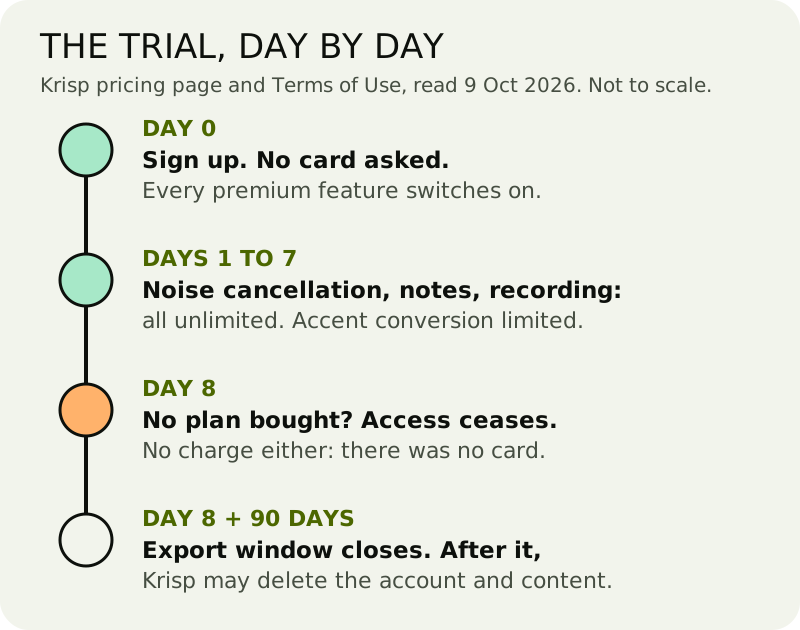
Krisp's Terms of Use (last updated 4 March 2026) are blunt about the ending: unless you buy a paid subscription before the trial period ends, the trial "will automatically expire", and access to Krisp "will immediately cease". There's no free tier to fall back to. The noise cancellation stops working; the Krisp Microphone device stops cleaning your voice.
Two things soften that. First, you can't be charged by accident, because the trial never asked for a card. Second, the same terms give you 90 days after expiry to get your content out: you "retain access to Your Content" for ninety days, "solely for the purpose of exporting" it. After that window, Krisp may delete the account and its content. If you used the trial's note-taker on meetings you want to keep, export within those 90 days.
So, to the question Bing users actually type: if your trial ends, do you have to pay, or can you just stop using it? You can just stop. Nothing renews on its own, because there's no subscription yet. You just lose access.
Core vs Advanced after the trial
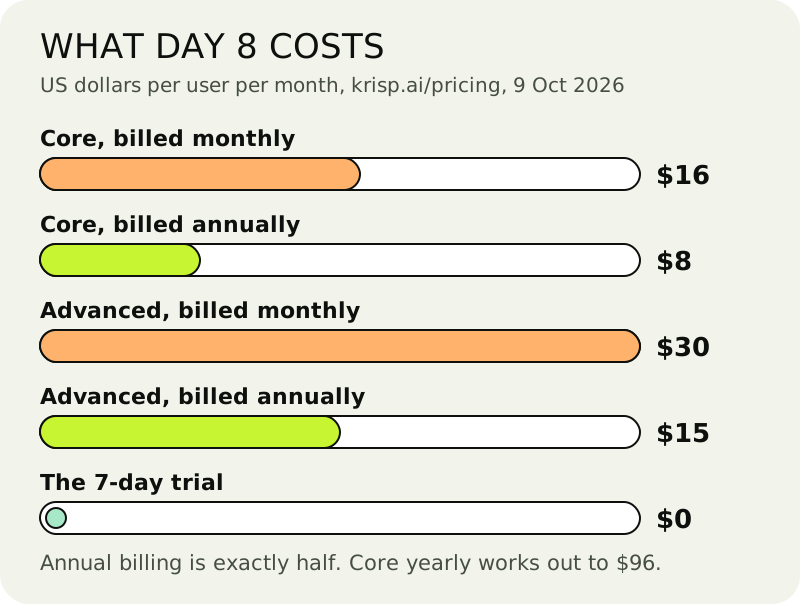
| Plan | Billed annually | Month to month | What it adds |
|---|---|---|---|
| Free Trial | $0 for 7 days | — | the full premium feature set; accent conversion limited; no card |
| Core | $8/user/month | $16/user/month | unlimited noise cancellation and AI note-taker; 1 hour a day of accent conversion; integrations such as HubSpot, Slack, Notion and Zapier; 10 GB storage |
| Advanced | $15/user/month | $30/user/month | adds Salesforce and ConnectWise, admin controls and 60 GB storage; more accent conversion |
| Enterprise | custom | custom | SSO/SCIM, HIPAA, on-device private transcription |
Prices from krisp.ai/pricing, as of 9 October 2026. Krisp's page shows a Monthly/Annually toggle marked "Save 50%", which is where the half-price annual figures come from.
For noise cancellation alone, Core is the plan to look at; Advanced earns its price through CRM integrations and admin controls, not cleaner audio. Core billed annually works out to $96 a year per user. Two terms to know before you pay: subscriptions renew automatically for further terms unless you cancel before renewal, and Krisp's terms say fees are non-refundable except where the agreement says otherwise.
How to spend the seven days
Treat the week as an audit, not as free cleanup. Install Krisp on the computer you take calls on, select Krisp Microphone and Krisp Speaker in your call app, and leave it on for the calls you'd actually pay to fix: the stand-up from the kitchen, the client call from the café, the interview with a dog next door. Turn your call app's own suppression down while you test, so you're hearing Krisp and not two filters fighting.
On day 6 or 7, switch Krisp off for one call. If nobody notices, you have your answer and it cost you nothing. If the difference is obvious, you know what the $8 a month is buying.
Free alternatives that don't expire
If day 8 comes and you don't buy, here's what never runs out. Every one of these wears our mint chip.
- NVIDIA Broadcast: free and unlimited, provided an RTX 2060 or better sits in your Windows PC.
- SteelSeries Sonar: free on Windows 10 (RS5+), any headset; the AI runs on the CPU.
- AMD Noise Suppression: free in AMD's Adrenalin software on Ryzen 6000 or Radeon RX 6000 hardware and newer.
- Discord's built-in Krisp: free, but only inside Discord. On a Mac it needs Apple silicon and macOS 12+.
- Your call app's own toggle: Zoom's Background noise suppression (Auto, Low, Medium, High) or the Teams desktop noise suppression switch.
- Mac Voice Isolation: in FaceTime and other apps that support Mic Modes.
The full ranking, with what each one costs you in hardware or limits, is on the free apps for calls page. Recording rather than calling? The online cleanup guide covers the free file tools.
Edge cases
"How do I get Krisp for free after the trial?" Legitimately, you don't. Discord's built-in Krisp is the one place Krisp's engine stays free, and it only works in Discord. Cracked installers and "unlocked" builds are a hard no: an unsigned program that asks for microphone access is exactly what you shouldn't give it to.
A second trial on a new email. We don't recommend it, and it doesn't solve anything: you'd be rotating trials instead of deciding. If you need more than a week to judge, the problem is probably that the free tools already cover you.
Teams and work accounts. Krisp's plans are priced per user. If your employer already pays for Krisp, check with them before starting a personal trial on a work machine.
Fair questions
- Does Krisp have a free trial?
- Yes. Krisp gives you seven free trial days with every premium feature (accent conversion is limited) and no credit card. That's the only free option Krisp sells; it no longer has a free plan.
- What happens after Krisp's free trial ends?
- Unless you buy a plan before day 8, Krisp's terms say access ceases immediately. You won't be charged, because no card was needed, and you get 90 days to export your content. Core then costs $8/user/month billed annually or $16 monthly.
- Do I have to pay when the Krisp trial ends, or can I just stop using it?
- You can just stop. There's no automatic charge at the end of the trial, because it starts without a card. Krisp simply stops working, and your recordings and notes stay available for export for 90 days.
- Does Krisp still have a free plan?
- Not any more. The permanent free plan was retired; as of 9 October 2026 Krisp's pricing page lists a 7-day trial, then Core ($8/$16) and Advanced ($15/$30) per user per month, annual/monthly. Inside Discord, the built-in Krisp toggle is free.
- Does the Krisp trial work on my phone?
- Not for meetings. Krisp's live noise cancellation is a desktop feature on Windows and macOS; the mobile app records and transcribes. The exception is the iPhone app's outgoing US phone calls, which Krisp says get noise cancellation.